Skip to content

GPT-6 Astra

Big Ideas. Real Creative Work.

Bring your ideas to life with GPT-6 Astra in MiniMax Design. Plan creative projects, coordinate image, video and design tools, and refine the results through conversation—from campaign visuals, anime and short dramas to motion graphics, 3D scenes and website concepts.

Download & Create with Astra

Why Create with GPT-6 Astra?

Plan the next step, bring the right tools into the project, make focused changes and reuse the process for your next brief.

Plan Complex Projects

Start with a goal, such as a product launch, and turn it into a production plan. GPT-6 Astra helps outline the message, identify the images, video shots and copy you need, and organize the work in order. Review the plan before creating assets, so each part of the project supports the same brief.

Connect Your Creative Tools

Bring planning and production into one project with MiniMax Design’s models, tools and connectors. Use a supported Blender connection to work on geometry, materials and lighting, or connect After Effects for motion graphics. Ask the Agent to coordinate the next action and inspect the result in the relevant tool.

Refine with Clear Feedback

Use the backpack revision example to see how feedback can guide a focused change. Tell the Agent which product detail to adjust and which parts of the shot to preserve. Compare the new version with the previous one, then refine the image or video further until the result fits your brief.

Reuse Your Workflows

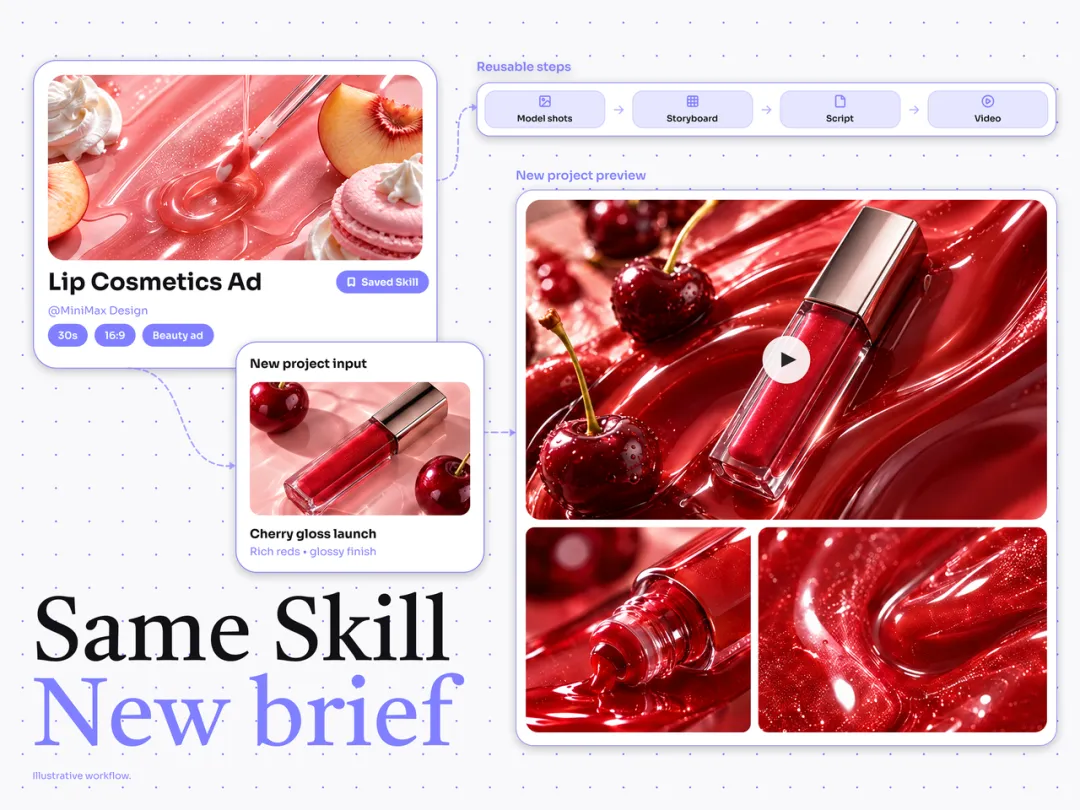
Turn a recurring creative process into a Skill you can use again. In the cosmetics example, a saved ad workflow becomes the starting point for a cherry lip gloss brief. Update the product, message and visual direction, then review the new assets while reusing the steps that already work.

A saved cosmetics ad Skill reused for a new cherry lip gloss brief

How to Use GPT-6 Astra in MiniMax Design

Download MiniMax Design for macOS or Windows, select GPT-6 Astra in Agent mode and start with a simple prompt.

GPT-6 Astra Prompts for Creative Projects

Try these adaptable example prompts for the creative scenarios above. Start with an ad, product photo or brand identity, or explore Blender, anime and website design. Replace the details with your own brief, copy a prompt and refine the first result.

01

AI Video Ad Prompt

“Plan a 15-second ad for [headphones or another product] for [audience]. Open with a clear hook, show the product in close-up and finish with [CTA]. Propose a shot list with timing, on-screen text and sound direction. Use only the product claims I provide. Let me review the plan, then help create and refine the assets with the available tools.”

02

AI Product Photography Prompt

“Create a product photography set for [wireless earbuds or another product]. Plan a clean studio hero image, a close-up of [key detail] and a lifestyle scene for [audience]. If I provide a product reference, use it to guide the shape, color and branding. Keep the lighting and background consistent. Show the first direction so I can review it before making variations.”

03

Brand Identity Design Prompt

“Develop a brand identity concept for [brand] aimed at [audience]. Propose a color palette, typography and logo directions, then bring the selected direction into a brand board with packaging, a product label and a business card mockup. Explain the visual choices. Let me choose a direction before refining the assets.”

04

Blender 3D Scene Prompt

“Help me build a product-display scene in Blender for [product]. Start with simple geometry, a neutral studio background and soft side lighting. Show a first camera view, then help me refine the materials and composition. Use the connected Blender workflow and explain any setup needed before starting.”

05

Anime & Short Drama Storyboard Prompt

“Plan a 30-second [anime scene or short drama] about [idea]. Write the story beats and a six-shot storyboard. For each shot, describe the action, framing, duration and dialogue or sound. Give it a strong opening and a clear ending. Let me review the storyboard before coordinating the visual and audio assets.”

06

Website & Landing Page Prompt

“Develop a landing page concept for [brand or product]. The main goal is [visitor action]. Propose the content order, headline and primary CTA, then plan desktop and mobile layouts. Identify missing product facts instead of inventing them. Show the structure before detailed design, then refine the page based on my feedback.”

GPT-6 Astra Pricing. More Room to Explore.

Agent usage is billed in credits for input and output tokens. Introductory rates apply to the first 10,000 credits under the promotion; check eligibility and current rates in the app. The example below covers Agent tokens only. Image, video and connected services may add separate costs.

Agent UsageIntroductory RateRegular Rate
Input · per 1M Tokens240 credits720 credits
Output · per 1M Tokens9,000 credits27,000 credits
A 10K Input + 2K Output Example20.4 credits for Agent tokens61.2 credits for Agent tokens

Frequently Asked Questions

What Is GPT-6 Astra and What Can It Do?

GPT-6 Astra is an AI model for complex tasks involving reasoning, planning and tools. In MiniMax Design, it is available as an Agent model option for creative projects. You can start with a simple idea and work toward a script, campaign plan, 3D scene or website concept, refining the direction as you go.

How Do I Get Started with GPT-6 Astra on Mac or Windows?

Download the MiniMax Design desktop app for macOS or Windows and sign in. Open model settings, select Agent and choose GPT-6 Astra. Check your membership access and credit balance, then enter a brief or copy one of the example prompts above.

How Much Does GPT-6 Astra Cost in MiniMax Design?

GPT-6 Astra uses credits based on your Agent usage. Check the app for current rates and introductory offers. Image, video and connected services may cost extra.

Do I Need to Install Blender or After Effects to Use a Connector?

For a workflow that uses Blender or After Effects, configure the supported application and its MiniMax Design connector first. The Agent uses that connection to work with the tool. You can begin planning your project in plain language; the connected actions available depend on your setup.

Can GPT-6 Astra Help Create AI Videos, Anime and Short Dramas?

Yes. In MiniMax Design, you can use the Agent to develop scripts, storyboards, shot lists and revision plans, and coordinate image, video and audio tools for production. Start with a story or ad idea, review the scene plan, then refine the assets and pacing. Media output depends on the generation tools selected for the project.

Can GPT-6 Astra Help with Website Design?

Use GPT-6 Astra in MiniMax Design to plan website content, landing page copy, visual direction and responsive layouts. Review the page concept and request changes through the tools available in your project. Building, publishing and hosting depend on the workflow you use.

How Do I Write a Good GPT-6 Astra Prompt?

Start with the result you want. Add an audience, format or reference if it helps, then ask for a first plan or draft. Review the result and explain what to keep or change. The copyable prompts above cover AI video ads, product photography, brand identity, Blender scenes, storyboards and website design.

What Can I Save, Edit or Export from a Project?

A project may produce scripts, storyboards, image or video assets, 3D scenes or website concepts. What you can save, edit and export depends on the generation tool or connected application used. Check its output and export options when you need a particular format or an editable project file.

Does a ChatGPT Subscription Cover MiniMax Design Usage?

MiniMax Design uses its own account, membership access and credit billing. A ChatGPT subscription does not replace a MiniMax Design plan. The rates on this page describe MiniMax Design Agent usage, not OpenAI API billing.

Can I Reuse Prompts and Workflows for the Next Project?

Yes. Adapt a useful prompt for a different product, story or audience. For recurring work, save the process as a reusable MiniMax Design Skill, then update the inputs for the next project. The cosmetics example above shows how a saved ad workflow can become the starting point for a new lip gloss brief.